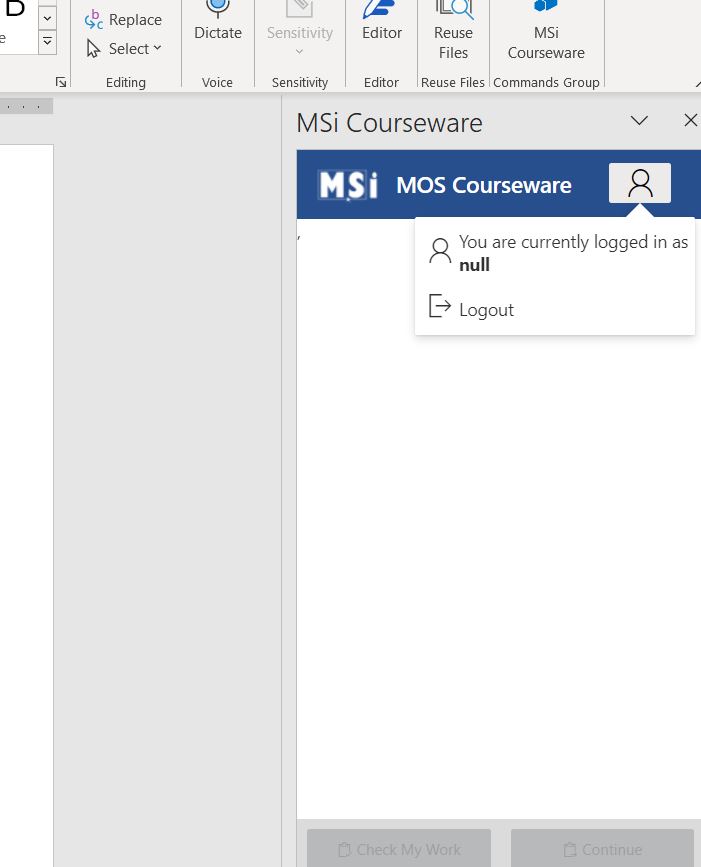
MS Office In-App Panel Null Login Error
If you see an error related to a NULL Login please be aware that or In-Office panel requires Office 365 or Office 2023 or higher. MS Office 2019 is not supported. We suggest you complete the activities by using the simulated versions.
Related Articles
MS Office In-App Panel Compatibility
Our In-Office panel requires Office 365 or Office 2021 or higher. MS Office 2019 is not supported with volume licensing only retail versions with WebView2 installed. We suggest you complete the activities by using the simulated versions or upgrade to ...Installing the Adobe In-App Panel
Installing Adobe In-App InApp Installation requires the Creative Cloud Desktop Application to download. If you already have Creative Cloud Desktop Application installed, you can skip this step. 1. Click "Stock & Marketplace" 2. Click "Manage Plugins" ...Adobe In-App File Extension Resolution
If you are experiencing an issue with the Adobe Panel where the activity is not validating please refer to this solution. In most installations, users encounter no issues. However, for those who do experience this specific problem, we've developed a ...MSi MOS Quick Start Guide to In Application Activities
MSI MOS QUICK START GUIDE TO INAPP ACTIVITIES & INFORMATION InApp and Simulation Activities: Information Simulation Practice and Quiz activities: Simulations are web-based and do not require Microsoft Word, PowerPoint or Excel installed. Ideal for ...Install MOS InApp
Installing MOS InApp Extension Steps to Begin an InApp Activity Scroll down to any Practice InApp Activity in your course. Click "Click here to download" to get the MOS Start file. Download the file, then open it inside Microsoft Word. Once opened, ...